Contact Fields Explained
Overview #
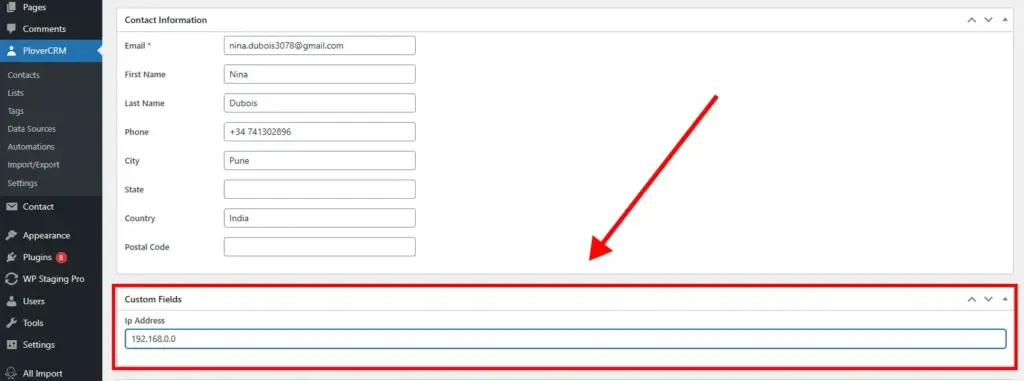
Contact fields store information about your contacts. PloverCRM supports standard fields (built-in) and custom fields (user-defined).
Field Types #
| Type | Description | Examples |
|---|---|---|
| Standard | Built-in, cannot be removed | Email, Name, Phone |
| Custom | User-defined, flexible | Company Name, Industry, Budget |
Standard Fields #
| Field | Notes |
|---|---|
| Validated format, can be unique | |
| First Name | Optional |
| Last Name | Optional |
| Full Name | Auto-generated from first + last |
| Phone | Any format, can be unique |
| City | Optional |
| State | Full name or abbreviation |
| Country | Full name or ISO code |
| Postal Code | Any format |
System Fields (Read-Only): Contact ID, Created At, Updated At, Avatar
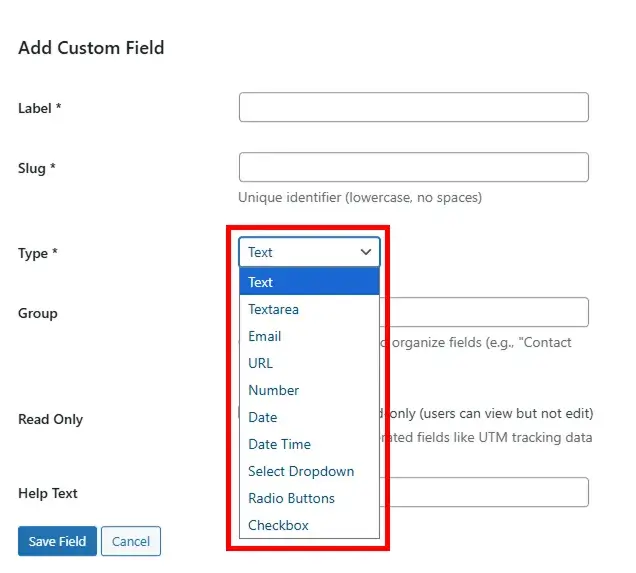
Custom Field Types #
| Type | Use For | Examples |
|---|---|---|
| Text | Short text (255 chars) | Company Name, Job Title |
| Textarea | Long text | Bio, Comments |
| Number | Numeric values | Age, Score, Rating |
| Additional emails | Work Email | |
| URL | Website links | LinkedIn, Portfolio |
| Date | Dates | Birth Date, Renewal Date |
| DateTime | Dates with time | Appointment, Follow-up |
| Select | Single choice | Industry, Priority |
| Multi-Select | Multiple choices | Interests, Products |
| Checkbox | Yes/No or multiple | Newsletter Opt-in |
| Radio | Single choice (visible) | Gender, Contact Method |
Auto-Generated Fields #
PloverCRM automatically captures additional information when contacts are created:
UTM Tracking: Source, medium, campaign, term, and content parameters from marketing campaigns
Device Detection: Device type, brand, operating system, and browser information
Location: IP information, submission URL, landing page, and referral domain
Stage Field #
Special field tracking contact lifecycle:
- Default Options: New, Contacted, On Trial, On Hold, At Risk, Unpaid, Paid, Lost
- Features: Customizable colors, cascade rename, deletion protection
Creating Custom Fields #
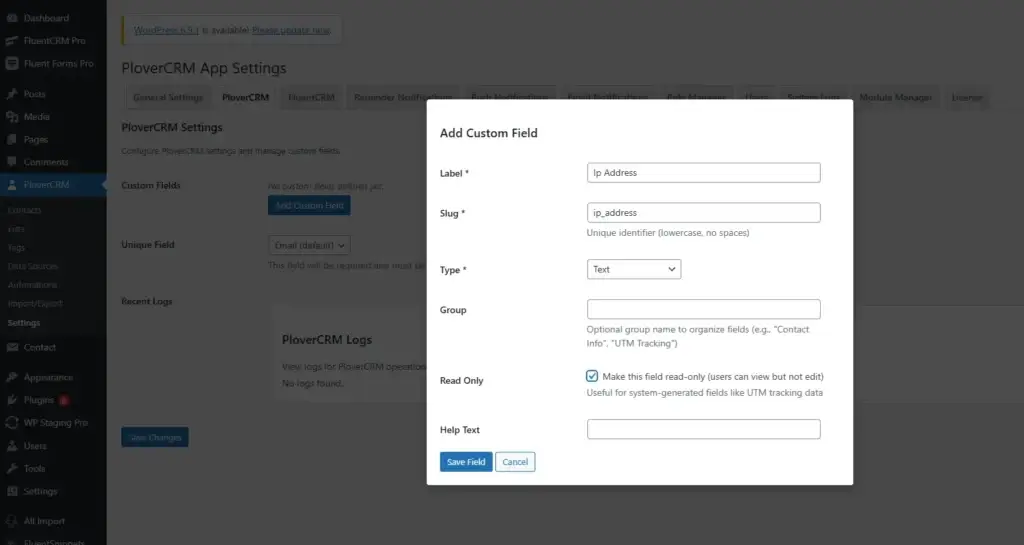
To Create Custom Fields:
- PloverCRM → Settings → PloverCRM tab
- Custom Fields → Add Custom Field
- Configure: Label, Type, Group, Options
- Save
Learn more: Custom Fields Overview
Naming Best Practices #
Field Names: Use clear, descriptive labels like “Company Name”, “Annual Revenue”, “Lead Source”
Consistency: Keep naming conventions consistent across your organization
Validation #
Built-in Validation: PloverCRM automatically validates:
- Email format
- URL format
- Numeric values
- Date format
- Required fields
Industry Examples #
B2B/SaaS: Company Size, Industry, Annual Revenue, Contract Value
E-commerce: Customer Type, Lifetime Value, Last Purchase, Loyalty Tier
Real Estate: Property Type, Budget Range, Preferred Location, Bedrooms
Healthcare: Date of Birth, Insurance Provider, Appointment Dates


